
PostgreSQL SHOW TABLES / DESCRIBE TABLE (psql + Supabase)
Coming from MySQL you type `SHOW TABLES` or `DESCRIBE table` and PostgreSQL throws a syntax error — both are MySQL commands. The psql equivalents are `\dt` (list tables) and `\d table_name` (describe a table); the portable SQL equivalents are `information_schema.tables` and `information_schema.columns`. Here is exactly what to run in psql, the Supabase SQL editor, Drizzle, or any client, plus why your query returns zero rows.

The one-line answer#
There is no SHOW TABLES in PostgreSQL, and there is no DESCRIBE TABLE
either — both are MySQL/Oracle commands. The psql client gives you \dt to
list tables and \d table_name to describe one; every other client gives you
information_schema.tables and information_schema.columns. That is the
whole article in four commands:
-- psql: list tables
\dt

-- psql: describe a single table
\d users

-- any client: list tables (Supabase SQL editor, Drizzle Studio, DataGrip, pgAdmin)
SELECT table_name
FROM information_schema.tables
WHERE table_schema = 'public'
  AND table_type = 'BASE TABLE'
ORDER BY table_name;

-- any client: describe a single table
SELECT column_name, data_type, is_nullable, column_default
FROM information_schema.columns
WHERE table_schema = 'public'
  AND table_name = 'users'
ORDER BY ordinal_position;
The rest of this article is the part that costs you an hour the first time: schema filtering, sizes, system tables, Supabase specifics, and the three reasons your query returns zero rows.
Method 1: \dt in psql#
\dt is a psql meta-command, not SQL. It only works inside the psql
client. The official PostgreSQL psql documentation documents it
under the relation-listing group:
| Command | What it lists |
|---|---|
\dt | User tables in the current schema search path |
\dt+ | Same, plus on-disk size, persistence, description |
\dtS | Include system tables (the S means "system") |
\dt schema.* | Tables in a specific schema |
\dt public.users | A specific table, if it exists |
-- List your tables
\dt

-- List with size and description
\dt+

-- List only tables in the "auth" schema
\dt auth.*

-- Include system tables (rarely what you want)
\dtS
The single most common mistake: running \dt in the Supabase SQL
editor, Drizzle Studio, or pgAdmin and getting a syntax error. Backslash
commands are psql-only — they are interpreted by the psql client before
the query ever reaches the server. Any client that is not psql will send
\dt to PostgreSQL as SQL, where it is a syntax error.
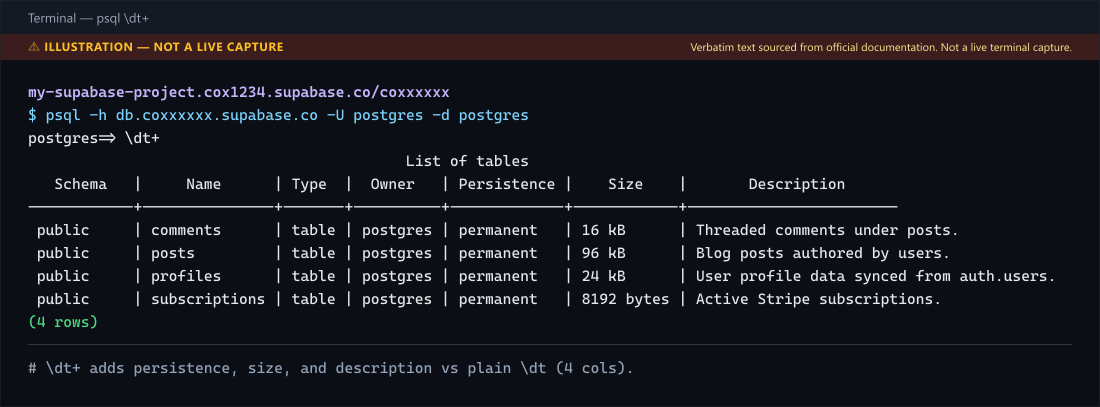
\d vs \dt#
\d without arguments lists every relation — tables, views, materialized
views, sequences, and foreign tables. It is the same as \dtvmsE. If you
only want tables, use \dt. If you want a single relation's schema (the
MySQL DESCRIBE table equivalent), use \d table_name — covered in the
PostgreSQL DESCRIBE TABLE equivalent.
Method 2: information_schema.tables (portable SQL)#
This is the query that works everywhere — psql, Supabase SQL editor, Drizzle Studio, DataGrip, pgAdmin, any driver. It is the SQL-standard way, and the simplest one in the Supabase SQL editor.
-- All tables in the public schema
SELECT table_name
FROM information_schema.tables
WHERE table_schema = 'public'
  AND table_type = 'BASE TABLE'
ORDER BY table_name;
The table_type = 'BASE TABLE' filter excludes views. Without it you get
both tables and views in the result.
Why you must filter by schema#
information_schema.tables returns tables and views in the current database
that your current role owns or has some privilege on, as the
PostgreSQL view documentation
specifies. This can include system objects. Run this without a schema filter:
SELECT table_schema, table_name
FROM information_schema.tables
ORDER BY table_schema, table_name;
You will get hundreds of rows from pg_catalog (the system catalog) and
information_schema itself. Those are not your tables. Always filter on
table_schema unless you genuinely want the system schemas:
-- Only your app tables (typical)
WHERE table_schema = 'public'

-- Multiple app schemas
WHERE table_schema IN ('public', 'auth', 'storage')

-- Everything except system schemas
WHERE table_schema NOT IN ('pg_catalog', 'information_schema', 'pg_toast')
List all tables across all schemas (excluding system schemas)#
SELECT table_schema, table_name
FROM information_schema.tables
WHERE table_type = 'BASE TABLE'
  AND table_schema NOT IN ('pg_catalog', 'information_schema', 'pg_toast')
ORDER BY table_schema, table_name;
This is the query to reach for when you do not know which schemas your app
uses — for example, a Supabase project with public, auth, storage,
and a custom billing schema.
Method 3: pg_class (the most granular)#
information_schema is the SQL standard, but it does not expose physical
metadata like on-disk size or row estimates. For that, query pg_class
directly. This is the approach the PostgreSQL docs describe
through the system catalogs.
-- List all user tables with their schema
SELECT n.nspname AS schema_name,
       c.relname AS table_name
FROM pg_class c
JOIN pg_namespace n ON n.oid = c.relnamespace
WHERE c.relkind = 'r'
  AND n.nspname NOT IN ('pg_catalog', 'information_schema')
ORDER BY n.nspname, c.relname;
relkind = 'r' means "ordinary heap table". Other useful values: p for
partitioned tables, v for views, m for materialized views, S for
sequences. If you want partitioned tables too, use c.relkind IN ('r', 'p').
List tables with their on-disk size#
information_schema.tables does not expose size. Use pg_class with
pg_total_relation_size():
SELECT n.nspname AS schema_name,
       c.relname AS table_name,
       pg_size_pretty(pg_total_relation_size(c.oid)) AS total_size
FROM pg_class c
JOIN pg_namespace n ON n.oid = c.relnamespace
WHERE c.relkind IN ('r', 'p')
  AND n.nspname NOT IN ('pg_catalog', 'information_schema')
ORDER BY pg_total_relation_size(c.oid) DESC;
pg_total_relation_size() includes the table, its indexes and TOAST data.
pg_table_size() excludes the table's indexes but still includes TOAST and
auxiliary storage; it is not just the main heap. Use pg_relation_size()
for the main relation fork and pg_indexes_size() for the table's indexes.
These distinctions are defined in the
database object size functions.
For partitioned tables, the parent has no row storage of its own: this query
does not add up its child partitions. Inspect the individual partitions
before treating a small parent size as the total dataset size.
Approximate row counts#
information_schema.tables does not give row counts either, and COUNT(*)
on every table is too expensive on a large database. Use the planner's
reltuples estimate:
SELECT c.relname AS table_name,
       c.reltuples::bigint AS approximate_row_count
FROM pg_class c
JOIN pg_namespace n ON n.oid = c.relnamespace
WHERE c.relkind = 'r'
  AND n.nspname = 'public'
ORDER BY c.reltuples DESC;
reltuples is updated by ANALYZE and is an estimate; -1 means that the
table has not yet been analysed. Use it to compare approximate table sizes,
not to report exact totals. SELECT COUNT(*) produces an exact count for
the query's snapshot, but can require scanning a table or an index. The
how to get count in Supabase article
covers the Supabase client side of the same problem.
Method 4: Supabase specifics#
Supabase runs PostgreSQL, so every method above works in the Supabase SQL
editor with one constraint: the SQL editor is not psql, so backslash
commands do not work. Use information_schema.tables or pg_class.
The Table Editor (zero-SQL path)#
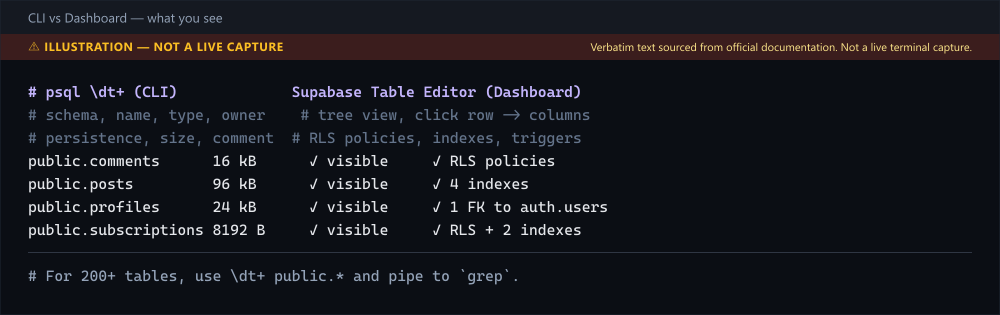
If you just want to see your tables in a browser, the Supabase Dashboard has
a Table Editor: Dashboard → Table Editor. It lists every table in every
schema your service role can see, with row counts and a quick-edit view. For
a developer pasting \dt into Google, the SQL editor query above is faster.
Listing tables with RLS enabled#
A common Supabase question is not "which tables exist" but "which tables
have row-level security enabled". That is a pg_class join against
pg_namespace with a check on relrowsecurity:
SELECT n.nspname AS schema_name,
       c.relname AS table_name,
       c.relrowsecurity AS rls_enabled
FROM pg_class c
JOIN pg_namespace n ON n.oid = c.relnamespace
WHERE c.relkind = 'r'
  AND n.nspname = 'public'
ORDER BY c.relrowsecurity DESC, c.relname;
relrowsecurity is true when RLS is enabled. To go deeper — auditing the
actual policies, not just the flag — see the
Supabase RLS policy design patterns
guide and the debugging Supabase RLS issues
post.
Listing tables in a specific schema (auth, storage, realtime)#
Supabase ships non-public schemas. To list tables in auth (Supabase
Auth's internal schema) or storage (Supabase Storage):
SELECT table_name
FROM information_schema.tables
WHERE table_schema = 'auth'
ORDER BY table_name;
Note: you will only see these schemas if your role has been granted access. Run administrative inventory queries through an authorised database connection or the dashboard SQL editor. A Supabase service-role API key is not a database connection string; do not put privileged credentials in a browser merely to list tables.
Why your query returns zero rows#
Three causes cover almost every "I ran the query and got nothing" report.
1. You are connected to the wrong database#
information_schema.tables is per-database. If you have two Supabase
projects and your connection string points at project A, you will not see
project B's tables. Confirm with:
SELECT current_database();2. The schema name is wrong or quoted differently#
PostgreSQL folds unquoted identifiers to lowercase. A table created as
CREATE TABLE "Users" lives in public.Users (capital U), but
WHERE table_schema = 'public' AND table_name = 'users' returns nothing
because the actual name is Users. Query without the name filter first,
then look at the exact table_name value. The same folding breaks raw SQL from an ORM: a Prisma $queryRaw that writes FROM item for a table named Item fails with 42P01 although the table exists.
3. Your role does not have access#
information_schema.tables only shows tables the current role has
privileges on. The anon role in Supabase sees very little; the postgres
role sees everything. If you run the query as anon and get an empty
result, connect as postgres or your service role and re-run. Role
privileges are a separate layer from client authentication: the
Postgres peer authentication failed
error happens earlier, at login, when pg_hba.conf uses peer and the OS
user does not match the database role.
Performance: do not SELECT COUNT(*) to list tables#
Listing table names requires metadata, not a count of every row. Looping
over all tables with SELECT COUNT(*) adds work that is unnecessary for
this task. For approximate row counts, use reltuples from Method 3.
If a particular estimate needs refreshing and your role has permission,
analyse that table rather than the entire database:
ANALYZE public.users;ANALYZE samples
data and writes planner statistics. It takes a lock and can wait behind
conflicting operations, so it is not a prerequisite for listing tables. For
the Supabase client equivalent (counting rows from the browser), see
how to get count in Supabase, which
covers the head: true trick that avoids fetching rows.
Production recommendations#
- Use
information_schema.tablesfor any non-psql client. It is the only portable way. Backslash commands will fail in the Supabase SQL editor, Drizzle Studio, and most ORMs. - Always filter on
table_schema. Without a filter you get hundreds of system tables that obscure your actual tables. - Use
pg_classfor size and row estimates.information_schema.tablesdoes not expose physical metadata;pg_classdoes. - Run
ANALYZEbefore trustingreltuples. The estimate is only as fresh as the last ANALYZE. On Supabase, the autovacuum default keeps it reasonably fresh, but a bulk import will leave it stale until the next run. - For schema auditing, combine
pg_classwithpg_namespaceandpg_description. That gives you table, schema, size, RLS flag, and comment in one query — the basis of any database design optimization review.
DESCRIBE TABLE in PostgreSQL: \d in psql, information_schema.columns everywhere else#
If you came from MySQL, you typed DESCRIBE users and PostgreSQL answered
with a syntax error:
postgres=# DESCRIBE users;
ERROR:  syntax error at or near "DESCRIBE"
LINE 1: DESCRIBE users;
        ^
DESCRIBE (and DESC) is a MySQL/Oracle command. PostgreSQL has nothing
called DESCRIBE TABLE. The canonical Stack Overflow answer (Q109325, ~1.7M views) is one line: in psql, use \d table_name.
\d table_name — the psql way to describe a table#
postgres=# \d users
                       Table "public.users"
   Column   |           Type           | Collation | Nullable | Default
------------+--------------------------+-----------+----------+---------
 id         | uuid                     |           | not null |
 email      | text                     |           | not null |
 created_at | timestamp with time zone |           | not null | now()
Indexes:
    "users_pkey" PRIMARY KEY, btree (id)
    "users_email_key" UNIQUE CONSTRAINT, btree (email)
Referenced by:
    TABLE "posts" CONSTRAINT "posts_user_id_fkey" FOREIGN KEY (user_id) REFERENCES users(id)
\d shows columns with types and nullability, indexes, and foreign-key
references — the MySQL DESCRIBE table; SHOW CREATE TABLE users; SHOW INDEX FROM users; triple, in one command. The + variant
(\d+ users) adds per-column Storage, Compression, Stats target and
Description (column comment) columns, plus the table's access method. For
the table's size and table-level comment, use \dt+ users instead:
postgres=# \d+ usersinformation_schema.columns — the portable way (Supabase, Drizzle, pgAdmin)#
information_schema.columns is the SQL-standard way to describe a table
outside psql:
SELECT column_name,
       data_type,
       character_maximum_length,
       is_nullable,
       column_default
FROM information_schema.columns
WHERE table_schema = 'public'
  AND table_name   = 'users'
ORDER BY ordinal_position;
For the indexes that DESCRIBE does not show, query the system view
pg_indexes (PostgreSQL has no information_schema.statistics; that view
is MySQL's):
SELECT indexname, indexdef
FROM pg_indexes
WHERE schemaname = 'public'
  AND tablename  = 'users';
For foreign keys (the REFERENCED BY block in psql), query
information_schema.table_constraints filtered on
constraint_type = 'FOREIGN KEY'. This is the same approach used by the
PostgreSQL DESCRIBE TABLE equivalent
article, which goes deeper on the pg_catalog side.
When you actually want EXPLAIN, not DESCRIBE#
DESCRIBE users answers "what columns does this table have". If you meant
"how is this query going to run", you want EXPLAIN (and EXPLAIN ANALYZE
to get the actual plan with row counts). They are not interchangeable:
EXPLAIN SELECT * FROM users WHERE email = 'mahdi@example.com';

EXPLAIN (ANALYZE, BUFFERS) SELECT * FROM users WHERE email = 'mahdi@example.com';
EXPLAIN works in psql, the Supabase SQL editor, Drizzle Studio, every
SQL client, and every ORM that lets you pass a raw query. There is no
client-side restriction on it the way there is on \dt or \d.
Listing views, materialized views, and sequences too#
\dt lists only tables (ordinary and partitioned). Real schemas also contain views, materialized
views, and sequences — and "show me everything in this schema" is a
different question from "show me the tables". Each has its own psql
meta-command and its own relkind filter in pg_class.
| Object type | psql command | relkind | information_schema view |
|---|---|---|---|
| Tables | \dt | r (heap) or p (partitioned) | information_schema.tables |
| Views | \dv | v | information_schema.views |
| Materialized views | \dm | m | (none — query pg_class) |
| Sequences | \ds | S | information_schema.sequences |
| Everything | \d | r,p,v,m,S,f | (no single view) |
To list every relation in the public schema regardless of type, in any
client:
SELECT c.relkind AS kind,
       n.nspname AS schema_name,
       c.relname AS relation_name
FROM pg_class c
JOIN pg_namespace n ON n.oid = c.relnamespace
WHERE n.nspname = 'public'
  AND c.relkind IN ('r', 'p', 'v', 'm', 'S')
ORDER BY c.relkind, c.relname;
This is the query to run when you inherit a database and need to know what
is in it before you touch anything. Materialized views are particularly
easy to miss because they do not show up in \dt and have no row in
information_schema.tables with table_type = 'BASE TABLE' — they are a
distinct relkind = 'm' and only appear in pg_class.
Refreshing materialized views#
A materialized view is a stored query result. It does not update
automatically; you refresh it with REFRESH MATERIALIZED VIEW view_name;. If you are listing tables to find "why is this data stale", the
materialized view is the usual suspect. List them first with \dm in psql
or the relkind = 'm' query above, then decide whether it needs a refresh.
PostgreSQL does not record when a materialized view was last refreshed
(pg_matviews has no such column), so teams that need that timestamp log
it themselves.
Further reading: Switch Databases in psql: The \connect Command (2026). Also see How to Exit psql: \q, exit, quit and Ctrl+D.
Frequently Asked Questions
Still stuck? Paste your error.
Paste the error message or stack trace — we check it against every fix and tool on the site.


One email a month — the latest explained errors
What the site published that month — mostly Next.js, Supabase and Node errors, explained. You confirm by email; unsubscribe any time in one click.
Continue Reading
PostgreSQL DESCRIBE TABLE: The psql \d Equivalent
Coming from MySQL you type DESCRIBE table and psql throws a syntax error. The psql equivalent is \d table_name. For Supabase, Drizzle, or any SQL client without backslash commands, use the information_schema.columns view.
Supabase Enums: ALTER TYPE ADD VALUE in Migrations
Step‑by‑step guide to adding a PostgreSQL enum type and column in Supabase, including verification and common pitfalls.
Extract date (yyyy/mm/dd) from a timestamp in PostgreSQL
Confused by extracting date from a timestamp in PostgreSQL? Learn how to cast to ::date, use date_trunc, and verify column types for straightforward table insertion.