
Next.js 16 Removed next lint: ESLint 9 Migration
Next.js 16 removed next lint and no longer lints on build. Migrate to ESLint 9 flat config with the codemod, an eslint.config.mjs, and the CI step.

What actually broke in Next.js 16#
Three things disappeared at once, and each one silently changes how your project behaves in CI:
next lintis removed. Runningnpx next lintin Next.js 16 fails withInvalid project directory provided, no such directory: …/lint: with nolintcommand left,nextreadslintas the project directory argument of its defaultdevcommand. If yourpackage.jsonhas"lint": "next lint", that script is now dead.- The
eslintnext.config key is removed.eslint: { ignoreDuringBuilds: true }innext.config.mjsis ignored — and so iseslint: { dirs: ['lib'] }— but not silently:next devwarns that the key is no longer supported (exact output in theignoreDuringBuildssection below). next buildno longer lints. Pre-16, a production build ran an ESLint pass and could fail the build on lint errors. That pass is gone. A build that used to turn red on a lint error now turns green.
This is a migration, not a regression. The Next.js team moved linting to the
ESLint CLI (or Biome) because next lint was a thin wrapper around ESLint
that lagged behind ESLint releases — the original incompatibility with
ESLint 9 was tracked for months in vercel/next.js#64409 before
being fixed, and the team decided to retire the wrapper entirely in v16.
The upgrade guide is the canonical source for the change; the flat-config default landed in PR #84874, and the migration codemod shipped in commit c57fe25.
The 30-second path: run the official codemod#
Next.js ships a codemod that does the mechanical part for you. From your project root:
npx @next/codemod@canary next-lint-to-eslint-cli .It does four things:
- Rewrites
package.jsonscripts."lint": "next lint"becomes"lint": "eslint .";--strictmaps to--max-warnings 0;--dir/--fileflags map to explicit paths. - Creates
eslint.config.mjswith the Next.js recommended flat config if you do not have one. - Updates an existing flat config to include the Next.js rules if it does not already.
- Installs the dependencies for you:
eslintandeslint-config-next. It also replaces anyFlatCompatusage (from@eslint/eslintrc) with the flat exports, as the codemod source shows.
Run it, then run npm run lint once to confirm the output is the same shape
as before. That is the happy path. The rest of this article is the unhappy
path — the parts the codemod cannot fix automatically.
Writing eslint.config.mjs by hand#
If the codemod does not cover your setup (monorepo, custom rules, Prettier
chain), here is the minimal flat config that reproduces what
eslint-config-next used to give you in legacy .eslintrc.json:
// eslint.config.mjs
import coreWebVitals from 'eslint-config-next/core-web-vitals'
import typescript from 'eslint-config-next/typescript'

const eslintConfig = [
  ...coreWebVitals,
  ...typescript,
  {
    ignores: [
      '.next/**',
      'out/**',
      'build/**',
      'next-env.d.ts',
      'node_modules/**',
    ],
  },
]

export default eslintConfig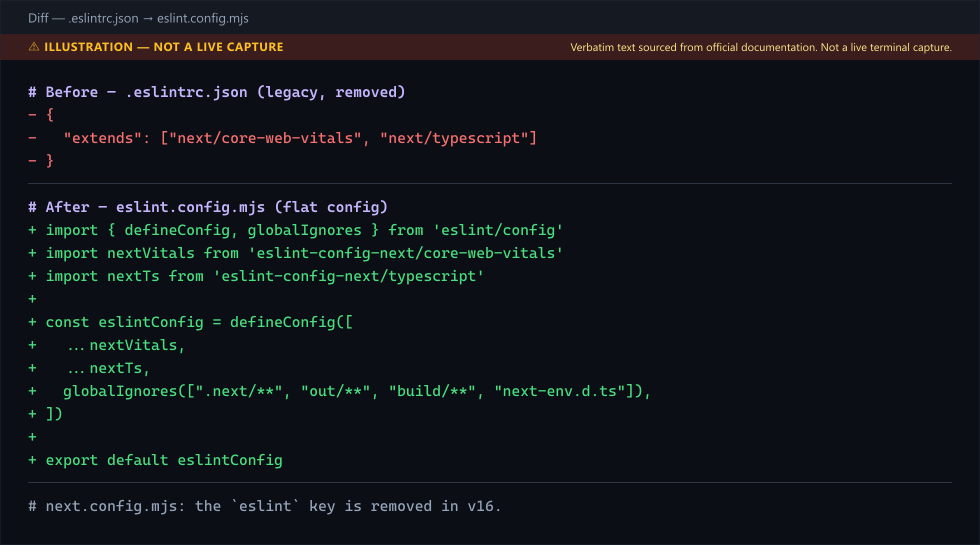
Two subpath exports matter, both confirmed in PR #84874:
eslint-config-next/core-web-vitals— the core-web-vitals ruleset (the onenext lintapplied by default).eslint-config-next/typescript— TypeScript-specific rules; add it only if your project uses TypeScript.
The spread is intentional: each export is an array of config objects, so you concatenate them into one flat config array.
package.json scripts that replace next lint#
The codemod writes these for you, but if you are setting them up manually:
{
  "scripts": {
    "dev": "next dev",
    "build": "npm run lint && next build",
    "start": "next start",
    "lint": "eslint .",
    "lint:fix": "eslint --fix ."
  }
}
Two details that bite people:
--max-warnings 0replaces--strict. The oldnext lint --strictflag turned warnings into errors. The ESLint CLI equivalent iseslint . --max-warnings 0. Put it in yourlintscript if you want CI to fail on warnings.next buildno longer lints, so add lint to the build script if your CI relied on the build to catch lint errors.npm run lint && next buildis the cheapest way to preserve the old behavior without a separate CI step.
Migrating from a legacy .eslintrc.json#
If you had a hand-written .eslintrc.json that extended next/core-web-vitals
and added custom rules, the codemod will not perfectly translate your custom
rules. The ESLint project publishes its own migration tool:
npx @eslint/migrate-config .eslintrc.jsonIt emits a starter eslint.config.mjs that may wrap your old extends
entries with FlatCompat from @eslint/eslintrc. Do not keep the next/*
entries in that wrapper: eslint-config-next v16 does not support backwards
compatibility of legacy config (PR #84874). Replace them with the
flat exports and carry your custom rules over:
// eslint.config.mjs
import coreWebVitals from 'eslint-config-next/core-web-vitals'
import typescript from 'eslint-config-next/typescript'

const eslintConfig = [
  ...coreWebVitals,
  ...typescript,
  {
    rules: {
      // your old custom rules land here
      'no-console': 'warn',
    },
  },
]

export default eslintConfig
FlatCompat is the bridge: it lets a flat config consume plugins and
shareable configs that still ship the legacy .eslintrc-style export. Use
it for any third-party plugin that has not migrated yet — for example, many
eslint-plugin-* packages on npm still export a legacy config object. Once
the plugin ships a flat config, you can drop the compat layer and import it
directly.
The .eslintrc plugins that have not migrated#
This is the part the upgrade guide skips. If your .eslintrc.json extended
plugin:prettier/recommended or any plugin that has not published a flat
config export, that extends entry has no direct flat-config equivalent.
Two fixes, in order of preference:
- Use the plugin's flat config export if it has one. Prettier, for
instance,
eslint-config-prettierexports a flat config ateslint-config-prettier/flat. Import it directly and place it last in your array. - Wrap with
FlatCompatif it does not.compat.extends('plugin:prettier/recommended')still works because@eslint/eslintrcknows how to translate the legacy format.
The current codemod does not install @eslint/eslintrc — it removes
FlatCompat usage in favour of the flat exports — so add it yourself
(npm i -D @eslint/eslintrc) only if a third-party plugin needs this wrapper.
Keep it in your devDependencies until every plugin in your tree has migrated;
then you can remove it.
CI/CD: where the silent break lives#
This is the highest-impact section. Pre-16, a typical GitHub Actions job looked like:
- run: npm run buildnext build ran ESLint, and a lint error failed the job. Post-16, the same
job is green on the same codebase even if it is full of lint errors,
because next build no longer lints. Your lint coverage silently drops to
zero the day you upgrade.
Fix it by adding an explicit lint step before the build:
jobs:
  ci:
    runs-on: ubuntu-latest
    steps:
      - uses: actions/checkout@v4
      - uses: actions/setup-node@v4
        with:
          node-version: 20
      - run: npm ci
      - run: npm run lint
      - run: npm run build
If you have a separate CI workflow that already ran next lint, change the
script call from next lint to eslint .. The Next.js + Supabase resource
hub collects the deployment and production guides,
but the one-line change for the lint step is
npx next lint → npx eslint ..
The ignoreDuringBuilds trap#
A lot of projects had this in next.config.mjs:
const nextConfig = {
  eslint: {
    ignoreDuringBuilds: true,
  },
}
In Next.js 16, the eslint key is removed. The config still loads, so the
file does not break, but Next.js warns about the key. On Next.js 16.4.0,
next dev prints:
⚠ `eslint` configuration in next.config.js is no longer supported. See more info here: https://nextjs.org/docs/app/api-reference/cli/next#next-lint-options
⚠ Invalid next.config.js options detected:
⚠     Unrecognized key(s) in object: 'eslint'
The key no longer does anything because the build no longer lints at all. You can leave the block in for a version or two as a
no-op, but the clean move is to delete it and move the ignore list into
eslint.config.mjs:
{
  ignores: ['scripts/**', 'docs/**'],
}
That puts all lint configuration in one place — the ESLint flat config —
instead of split between next.config.mjs and .eslintrc.
Common pitfalls, ranked by how often they bite#
1. Invalid project directory provided, no such directory: …/lint in CI.
Your CI script still calls next lint, and next reads lint as the
project directory of its default dev command. Change it to eslint . (or run the codemod, which rewrites the
lint script). This is the single most common upgrade break.
2. An old .eslintrc.json carried into a Next.js 16 project. You copied
an .eslintrc.json that extends next/core-web-vitals, but eslint-config-next
v16 does not support backwards compatibility of legacy config
(PR #84874). Replace the file with
eslint.config.mjs that imports from eslint-config-next/core-web-vitals — the shape Next.js documents in its ESLint configuration reference.
3. next build is green, lint is broken. You removed the lint step
during the upgrade and never added it back. Add npm run lint to CI before
next build — otherwise lint regressions ship to production undetected.
This is the silent-coverage bug above.
4. TypeScript rules missing. You added eslint-config-next/core-web-vitals
but forgot eslint-config-next/typescript. Your @typescript-eslint rules
disappear and no-unused-vars no longer catches unused TS variables. Add
the TypeScript export to the array.
5. Parsing error: Cannot find module 'next/babel'. This is a
different, older issue — ESLint resolving modules separately from the
Next.js build and failing to find next/babel, most often in monorepos and
pnpm workspaces. It is covered separately in the
next/babel parsing error fix;
do not conflate it with the flat-config migration.
A note on Turbopack#
next build --turbopack (the Turbopack bundler) is unrelated to this
change. Turbopack replaces Webpack as the bundler; it does not change how
linting works. If you hit a build error after upgrading and it mentions
Turbopack, it is a bundler issue, not a lint issue — the
Turbopack stuck fix covers that
separately. Do not try to "fix" a Turbopack error by editing your ESLint
config.
Verifying the migration worked#
Three checks, in order:
npm run lintruns and exits cleanly. If it fails while loading a plugin's shared config, that plugin may still ship legacy config — wrap it withFlatCompat.npm run buildsucceeds and the build log does not contain a lint pass. Pre-16, the build log had a "Linting and checking validity of types" step; post-16, that step is absent. That absence is correct.- CI fails on a deliberately introduced lint error. Add
const _x = 1to a file, push, and confirm the CI job fails on thenpm run lintstep. If it passes, the CI job is not runningnpm run lintat all.
Production recommendations#
- Pin
eslintandeslint-config-nextto the same minor version as Next.js. Aeslint-config-nextmajor bump can change rule severity without warning; lock the version inpackage.json. - Run
lint:fixin pre-commit, not in CI. CI should runeslint .(read-only) and fail on errors. Auto-fixing in CI hides the signal. - Add
eslint . --max-warnings 0to CI only after you reach zero warnings. Turning warnings into errors before the codebase is clean makes CI red for weeks. - Keep
@eslint/eslintrcin devDependencies until every plugin in your tree has a flat-config export. Then remove it — the compat layer is dead weight once you do not need it. - Move all ignore patterns into
eslint.config.mjs, notnext.config.mjs. One source of truth for lint config is the whole point of the migration.
Further reading: How to Change the Port in Next.js (and Fix EADDRINUSE). Also see Why global-error.tsx Doesn't Fire in Next.js Dev Mode.
Frequently Asked Questions
Still stuck? Paste your error.
Paste the error message or stack trace — we check it against every fix and tool on the site.

One email a month — the latest explained errors
What the site published that month — mostly Next.js, Supabase and Node errors, explained. You confirm by email; unsubscribe any time in one click.
Related Guides
Next.js Pages to App Router Migration Gotchas
Migrating Pages Router to App Router? Avoid cookies timing bugs, router.events removal, metadata conflicts, and auth middleware breaks.
Next.js Server Actions with Supabase: Complete Guide
Complete guide to Next.js Server Actions with Supabase. Learn validation, error handling, optimistic updates, and production patterns for type-safe forms.
Next.js Performance Optimization for Indie Developers
Ship a fast Next.js app: Core Web Vitals, image and font optimization, bundle trimming, caching, and the RUM checks that catch regressions.