Next.js Scroll Resets When searchParams Change
Next.js App Router resets scroll position to top whenever searchParams update. Here is the root cause and the scroll-restoration fix that works.
 Mahdi Ben Rhouma · Updated
 What actually changed#
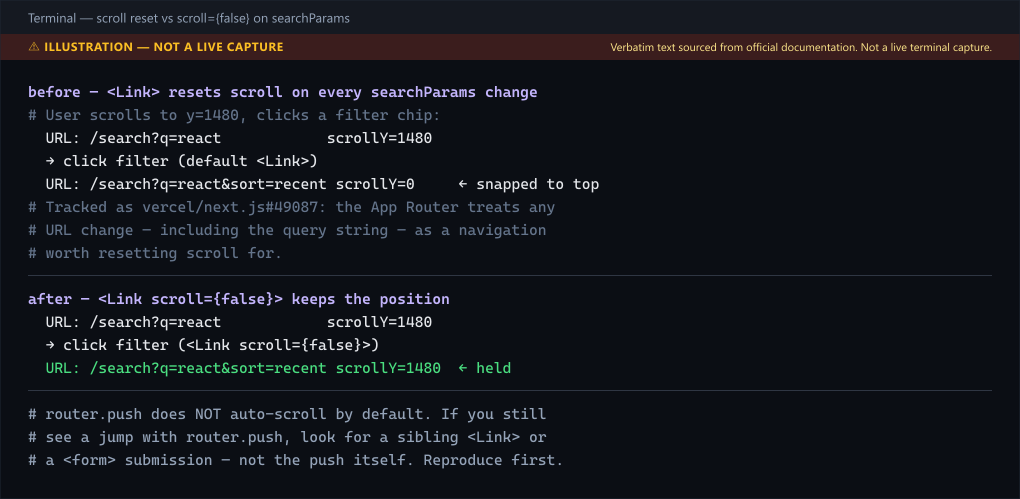
You built a search or filter page. The user scrolls down, clicks a filter chip, the URL updates from /search?q=react to /search?q=react&sort=recent, the results re-render — and the viewport snaps back to the top. The user has to scroll back down to find where they were.
This is not a hydration bug and not a cache bug. It is the App Router's scroll-restoration policy, which treats any URL change (including the query string) as a navigation worth resetting. The behavior has been reported since App Router shipped and is tracked as vercel/next.js#49087.
The fix#
The fix depends on how you trigger the navigation.
Case 1 — you navigate with <Link>#
<Link> scrolls to the top of the new page by default. Opt out per-link:
import Link from 'next/link'

export function FilterChip({ label, href }: { label: string; href: string }) {
  return (
    <Link href={href} scroll={false}>
      {label}
    </Link>
  )
}
This is the documented, supported fix. Use it when the searchParams change re-renders results in place and the user's scroll position is still meaningful.
Case 2 — you navigate with router.push#
router.push does not auto-scroll. If you are seeing a jump with router.push, the cause is almost always a sibling <Link> or a <form> submission, not the push itself. Verify with a minimal reproduction before patching.
'use client'

import { useRouter, useSearchParams } from 'next/navigation'

export function SortControl() {
  const router = useRouter()
  const params = useSearchParams()

  return (
    <select
      value={params.get('sort') ?? 'recent'}
      onChange={(e) => {
        const next = new URLSearchParams(params)
        if (e.target.value === 'recent') next.delete('sort')
        else next.set('sort', e.target.value)
        // No scroll reset happens here — router.push does not scroll.
        router.push(`/search?${next.toString()}`)
      }}
    >
      <option value="recent">Recent</option>
      <option value="popular">Popular</option>
    </select>
  )
}
If you do want a reset with router.push, call window.scrollTo(0, 0) explicitly after — do not rely on implicit behavior.
Case 3 — you genuinely want scroll restoration after a filter change#
When the user clicks a filter that reorders the list they are reading, keeping them at the same pixel can be worse than resetting. But if you have a long sidebar and only the main column re-renders, restoration is correct:
'use client'

import { useEffect, useRef } from 'react'
import { useSearchParams } from 'next/navigation'

// Keep the viewport anchored when a filter change re-renders the list.
// Pair with <Link scroll={false}> so the router's own reset does not fight us.
export function useStableScroll() {
  const params = useSearchParams()
  const savedY = useRef(0)

  // Track scroll continuously, so we always have the latest position
  // before the navigation fires — not just the value at mount.
  useEffect(() => {
    const onScroll = () => { savedY.current = window.scrollY }
    window.addEventListener('scroll', onScroll, { passive: true })
    return () => window.removeEventListener('scroll', onScroll)
  }, [])

  // After the new searchParams render, restore. The 0-ms timeout lets
  // the new layout commit before we jump.
  useEffect(() => {
    const id = window.setTimeout(() => window.scrollTo(0, savedY.current), 0)
    return () => window.clearTimeout(id)
  }, [params])
}
Pair this with <Link scroll={false}> so the save/restore cycle is not fought by the router's own reset.
Verifying the fix#
- Open your search page, scroll to the middle, and click a filter.
- The URL must update; the viewport must stay where it was.
- Hard-reload the filtered URL — the page should mount at the top (restoration only applies to in-app navigation, not full reloads, which is the correct browser behavior).
- Tab through with the keyboard. Focus should not jump to the top either; if it does, an auto-focus on mount is competing with your restore.
If the page crashes with useSearchParams() should be wrapped in a suspense boundary, that is a separate fix — App Router requires a <Suspense> boundary around any component that reads useSearchParams during static rendering. The missing Suspense boundary fix walkthrough covers the exact boundary placement.
Coming from Pages Router: there is no shallow: true#
Pages Router's next/router had a shallow option — router.push(url, undefined, { shallow: true }) — that updated the URL and router.query without re-running data
fetching or scrolling. Teams migrating to App Router go looking for the same option on
useRouter from next/navigation and don't find it, because App Router has no shallow
routing concept: every router.push and router.replace re-renders the segment tree
for the new URL, full stop. The
Pages to App Router migration guide
covers the rest of the next/router → next/navigation API surface that changes shape
during this move, not just this one option.
What replaces shallow: true depends on what it was actually being used for:
- Avoiding a scroll jump — that's exactly what
scroll={false}on<Link>handles, covered above. There's norouter.pushequivalent flag;router.pushalready doesn't auto-scroll (see Case 2), so nothing extra is needed there. - Avoiding a data refetch on query-string-only changes — in App Router this is a
caching question, not a routing one. A Server Component reading
searchParamswill re-render on any query change by design; if that re-render is triggering an unnecessary network request rather than a cheap re-render, the fix is in how that fetch is cached (fetchoptions, route segment config), not in the router call. - Reading the updated query string without a re-render — Client Components can read
searchParamsviauseSearchParams()reactively without triggering the navigation themselves, so a component that only needs to observe the current value (not change it) doesn't need any router option at all.
Treat any App Router code sample that references shallow as written against Pages
Router — it will not run under next/navigation, and there's no drop-in flag to restore
the old behavior; the fix is redesigning around what App Router actually re-renders.
Further reading: use client vs use server in Next.js: The Real Difference.
Still stuck? Paste your error.
Paste the error message or stack trace — we check it against every fix and tool on the site.

Related fixes & guides
- Fix: Next.js middleware not triggering
- Next.js "Server Is Running Out of Memory" Fix (2026)
- Fix barrel_optimize Build Warnings with MUI in Next.js
- Next.js 15 Partial Prerendering: Guide
- Next.js Server Actions with Supabase: Complete Guide
- Next.js 16 Removed next lint: ESLint 9 Migration
- Next.js 15 Caching Explained: Why Data Shows Stale
- Next.js favicon not working: app/favicon.ico vs public/
- Fix Dynamic Server Usage Error in Next.js App Router
- How to Change the Port in Next.js (dev and start)