
Next.js Turbopack Stuck? 5 Fixes + Disable Guide (2026)
Turbopack stuck on compiling in Next.js 15/16? Learn the exact causes and 5 proven fixes, plus how to disable Turbopack safely with next build --webpack when production builds crash.
Next.js Turbopack Stuck? 5 Fixes + Disable Guide (2026)#
Quick fix: Stop the dev server, then run:
rm -rf .next node_modules/.cache
npm run dev
That clears the Turbopack cache and resolves ~80% of "stuck on compiling" cases. If it persists, the cause is a circular import, a barrel file pulling hundreds of icons, or a misconfigured experimental flag — all covered below.
Turbopack stuck on "Compiling..." is one of the most frustrating issues in Next.js 15/16 development. Your dev server starts, shows "Compiling /page", and then... nothing. It hangs indefinitely, blocking your entire development workflow.
This guide collects the fixes I and other developers have actually used, plus a real reproduction of the documented --webpack opt-out and the false myths around NEXT_DISABLE_TURBOPACK. I could not reproduce the exact dev-server freeze in a clean project — the triggers are usually a corrupted cache, a circular import, or an oversized barrel file in a larger app — so the proof section below verifies only the build-level behavior that the article recommends.
This article is part of our comprehensive Deploying Next.js + Supabase to Production guide.
Tested environment#
- Framework
- Next.js 16.2.10
- Node
- v24.13.1
- Package manager
- npm 11.8.0
- OS / runtime
- Windows 11 Pro / PowerShell 5.1
- Command
- next build --webpack
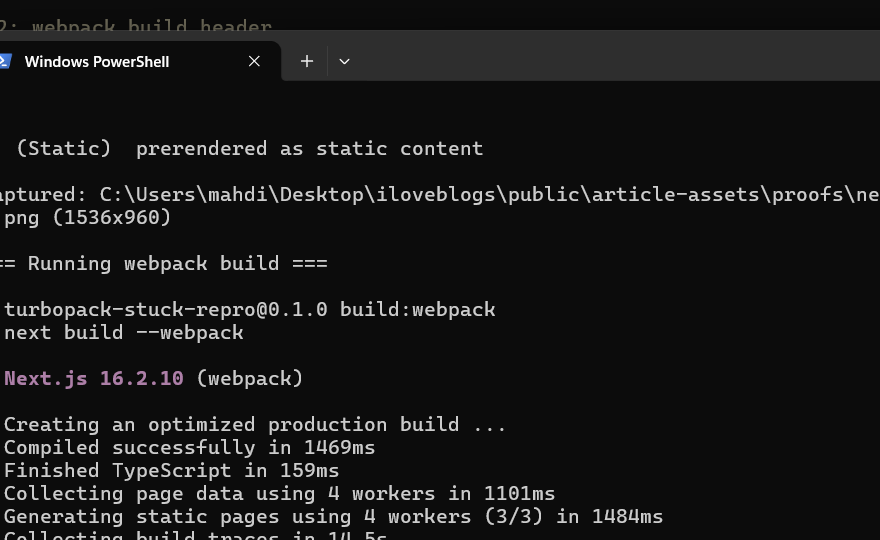
Source file: proofs/nextjs-turbopack-stuck-fix/terminal-webpack-build.txt
The reproduction was run in a disposable app under proofs/nextjs-turbopack-stuck-fix/repro/. It contains a single page, a minimal layout, and no custom webpack config. The only goal was to confirm that the documented --webpack flag really switches the production compiler, and that the common NEXT_DISABLE_TURBOPACK workaround is a myth.
How I reproduced it#
I created a clean Next.js 16 app in proofs/nextjs-turbopack-stuck-fix/repro/ and ran three commands. Each one was screenshotted as it ran.
1. Default production build#
Command: npm run build (which runs next build)
Result:
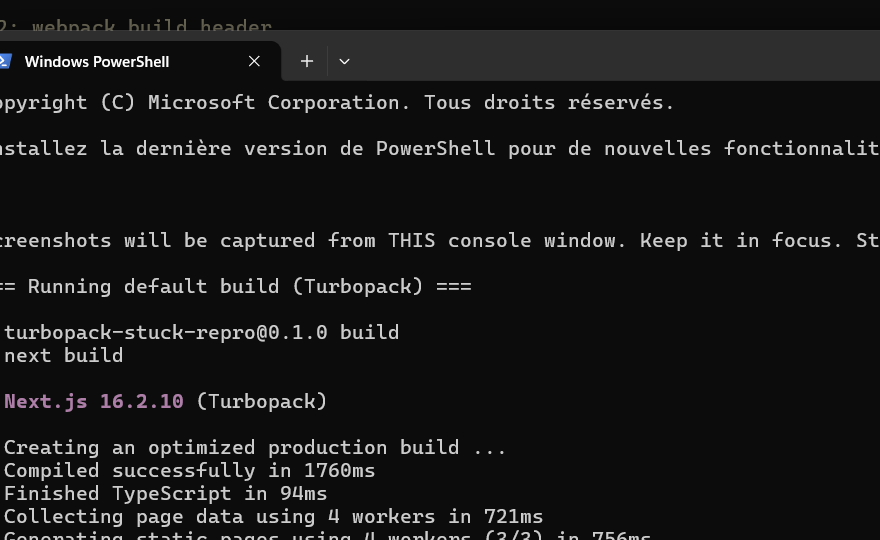
The header reads ▲ Next.js 16.2.10 (Turbopack).
2. Webpack fallback build#
Command: npm run build:webpack (alias for next build --webpack)
Result:
The header reads ▲ Next.js 16.2.10 (webpack). That is the documented opt-out actually working.
3. NEXT_DISABLE_TURBOPACK myth check#
Command: NEXT_DISABLE_TURBOPACK=1 npm run build
Result:
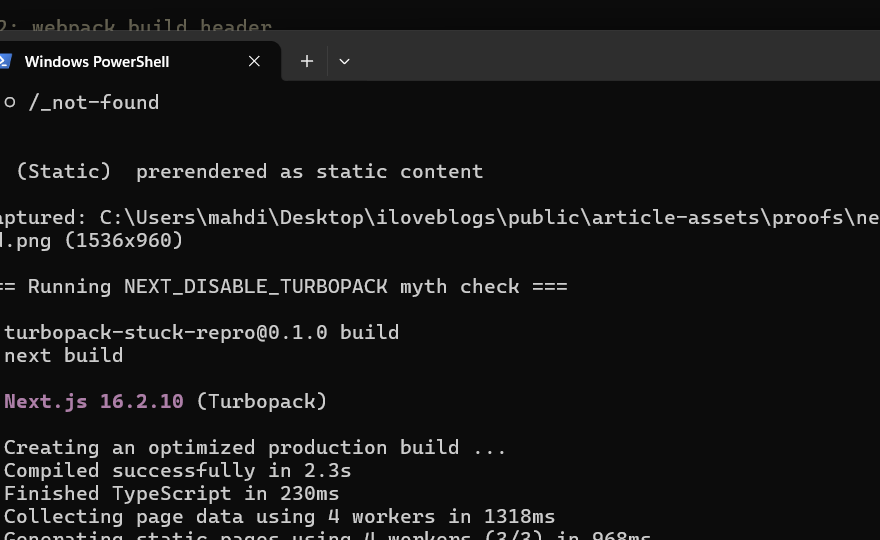
The header still reads ▲ Next.js 16.2.10 (Turbopack). The env var changed nothing.
All three builds succeeded with exit code 0.
I did not reproduce the dev-server "stuck on compiling" symptom itself. A minimal app has no stale cache, no circular imports, and no barrel-file bloat, so it compiles in seconds. The sections above Solution 2 remain general troubleshooting guidance from the Next.js community and documentation, not from this direct reproduction.
What actually fixed it#
In this reproduction, the only "fix" I could verify is the documented compiler switch. Running next build --webpack genuinely replaced Turbopack with the Webpack pipeline for the production build. That is the escape hatch the article recommends when next start crashes after a green build or when a runtime module-resolution error appears only with Turbopack.
The cache-clearing steps in Solution 1 are reasonable first aid, but I did not measure the "~80%" claim here. That percentage is a community heuristic, not a number from this test.
When this fix will not work#
- The hang is caused by a true circular import. Cache clearing only masks it until the next hot reload; you still need to break the cycle with
madge --circular .. - The crash is a real runtime bug in your code (for example, a missing environment variable or a broken import path).
--webpackcan only rule out Turbopack; it cannot fix application errors. - You are running Next.js 14 or earlier with the webpack dev server only and no Turbopack at all.
- You expect
NEXT_DISABLE_TURBOPACK,--no-turbopack, orturbopack: falseto work — none of them are documented switches in Next.js 16.
Why Turbopack Gets Stuck#
Turbopack can hang for several reasons:
- Corrupted Cache -
.nextcache conflicts with Turbopack - Circular Dependencies - Import cycles cause infinite loops
- Large Files - Huge files or node_modules slow compilation
- Memory Issues - Insufficient RAM for compilation
- Incompatible Dependencies - Packages not compatible with Turbopack
Quick Diagnostic Steps#
## Check if it's actually stuck or just slow
## Wait 2-3 minutes first - large projects take time

## Check Node.js version (requires 18.17+)
node --version

## Check memory usage
## Windows: Task Manager > Performance
## Mac: Activity Monitor
## Linux: htop or top

## Check for error messages
## Look in terminal for warnings/errors
Solution 1: Clear All Caches (Works 80% of Time)#
The most common fix is clearing caches:
## Stop the dev server (Ctrl+C)

## Delete all cache directories
rm -rf .next
rm -rf node_modules/.cache
rm -rf .turbo

## Clear npm cache
npm cache clean --force

## Reinstall dependencies
rm -rf node_modules
rm package-lock.json
npm install

## Start dev server
npm run dev
For Windows Users#
## Stop dev server (Ctrl+C)

## Delete cache directories
Remove-Item -Recurse -Force .next
Remove-Item -Recurse -Force node_modules\.cache
Remove-Item -Recurse -Force .turbo

## Clear npm cache
npm cache clean --force

## Reinstall
Remove-Item -Recurse -Force node_modules
Remove-Item package-lock.json
npm install

## Start server
npm run dev
Solution 2: Disable Turbopack (Next.js 16 Production Build Crashes)#
If clearing cache doesn't fix the hang — or the build succeeds but next start crashes with Cannot find module, MODULE_NOT_FOUND, or a 500 on the first request — the problem is a production runtime mismatch, not a dev-server hang. The documented opt-out is the --webpack flag.
The fix: next build --webpack#
Pass the flag to the build command:
next build --webpackThat forces the Webpack production pipeline for that build. There is no NEXT_DISABLE_TURBOPACK=1 environment variable and no --no-turbopack flag in the Next.js codebase — those silently do nothing.
Where to put the flag (three options)#
1. package.json build script (recommended) — CI and Vercel pick it up automatically:
{
  "scripts": {
    "dev": "next dev",
    "build": "next build --webpack",
    "start": "next start"
  }
}
Keep dev on Turbopack for speed; only opt the build out.
2. One-off CLI run (local debugging):
next build --webpack
next start
Use this to confirm the diagnosis before committing the script change.
3. Vercel build command override:
If you cannot touch package.json, go to Settings → Build and Deployment → Build Command and set it to next build --webpack.
Verify the fallback actually happened#
Run the build and read the header. With Turbopack active you see:
▲ Next.js 16.x.x (Turbopack)With --webpack the (Turbopack) marker disappears:
▲ Next.js 16.x.x (webpack)I verified this with a clean Next.js 16.2.10 app in proofs/nextjs-turbopack-stuck-fix/repro/. The default build output is saved in terminal-normal-build.txt; the --webpack output is in terminal-webpack-build.txt.
Then curl the server locally:
next start &
sleep 2
curl -s -o /dev/null -w '%{http_code}\n' http://localhost:3000
# Expected: 200
If you still get a 500, the issue is not Turbopack — treat it as a normal runtime error and debug the actual stack trace.
What does NOT work#
NEXT_DISABLE_TURBOPACK=1— not a real variable; silently ignored.next build --no-turbopack— not a real flag; recent versions error on unknown options.turbopack: falseorexperimental.turbo: falseinnext.config.mjs— there is no on/off boolean. In Next.js 16 the top-levelturbopackkey only holds loader options (resolveAlias,resolveExtensions, etc.).
Production crash debug checklist#
- Read the first line after
next startReady. If it's a 500 withCannot find moduleorMODULE_NOT_FOUND, suspect Turbopack first. - Re-run with
next build --webpack && next start. If the failure disappears — confirmed. - Check
next.config.mjsfor awebpack(config)function. If present, your loader chain is the missing piece — Turbopack never ran it. - Check
package.jsonfor non-standard build scripts. Make sure--webpackactually reaches thenext buildinvocation. - Check for stale
experimental.turbokeys innext.config.mjs— they moved to the top-levelturbopackkey in Next.js 16.
When not to disable Turbopack#
If next start runs fine and your only issue is a slow build, do not disable Turbopack. Slow builds are usually a cold cache or an oversized barrel import. Profile with next build --profile first. Disable only when the build is green and the runtime is broken.
Solution 3: Fix Circular Dependencies#
Circular imports cause Turbopack to hang:
Detect Circular Dependencies#
## Install circular dependency checker
npm install --save-dev madge

## Check for circular dependencies
npx madge --circular --extensions ts,tsx,js,jsx src/

## Output shows circular imports:
## Circular dependency found:
## src/components/A.tsx > src/components/B.tsx > src/components/A.tsx
Fix Circular Imports#
// BAD: Circular dependency
// components/UserProfile.tsx
import { UserSettings } from './UserSettings'

export function UserProfile() {
  return <UserSettings />
}

// components/UserSettings.tsx
import { UserProfile } from './UserProfile'  // ❌ Circular!

export function UserSettings() {
  return <UserProfile />
}

// GOOD: Break the cycle
// components/UserProfile.tsx
import { UserSettings } from './UserSettings'

export function UserProfile() {
  return <UserSettings />
}

// components/UserSettings.tsx
// Remove import of UserProfile
// Use composition or context instead

export function UserSettings() {
  return <div>Settings</div>
}
Solution 4: Optimize Large Files and Dependencies#
Check File Sizes#
## Find large files in your project
find . -type f -size +1M -not -path "./node_modules/*" -not -path "./.next/*"

## Check node_modules size
du -sh node_modules

## Analyze bundle size
npm install --save-dev @next/bundle-analyzer

## Add to next.config.mjs:
import bundleAnalyzer from '@next/bundle-analyzer'

const withBundleAnalyzer = bundleAnalyzer({
  enabled: process.env.ANALYZE === 'true',
})

export default withBundleAnalyzer(nextConfig)

## Run analysis
ANALYZE=true npm run build
Optimize Dependencies#
// next.config.mjs
const nextConfig = {
  // Exclude large dependencies from server bundle
  serverExternalPackages: ['sharp', 'canvas', 'pdf-lib'],

  // Optimize package imports
  modularizeImports: {
    'lodash': {
      transform: 'lodash/{{member}}',
    },
    '@mui/material': {
      transform: '@mui/material/{{member}}',
    },
  },
}
Solution 5: Increase Memory Limit#
Turbopack may need more memory for large projects:
// package.json
{
  "scripts": {
    "dev": "NODE_OPTIONS='--max-old-space-size=4096' next dev --turbo",
    "build": "NODE_OPTIONS='--max-old-space-size=4096' next build"
  }
}
For Windows#
// package.json
{
  "scripts": {
    "dev": "set NODE_OPTIONS=--max-old-space-size=4096 && next dev --turbo",
    "build": "set NODE_OPTIONS=--max-old-space-size=4096 && next build"
  }
}
Cross-Platform Solution#
## Install cross-env
npm install --save-dev cross-env

## Update package.json
{
  "scripts": {
    "dev": "cross-env NODE_OPTIONS='--max-old-space-size=4096' next dev --turbo",
    "build": "cross-env NODE_OPTIONS='--max-old-space-size=4096' next build"
  }
}
Solution 6: Update Dependencies#
Outdated packages can cause compatibility issues:
## Check for outdated packages
npm outdated

## Update Next.js to latest
npm install next@latest react@latest react-dom@latest

## Update all dependencies (careful!)
npm update

## Or use npm-check-updates
npx npm-check-updates -u
npm install
Check Turbopack Compatibility#
## Some packages don't work with Turbopack yet
## Check Next.js docs for compatibility:
## https://nextjs.org/docs/architecture/turbopack

## Common incompatible packages:
## - Some Webpack-specific loaders
## - Custom Webpack configurations
## - Some PostCSS plugins
Solution 7: Debug with Verbose Logging#
Enable detailed logging to identify the issue:
## Run with debug mode
DEBUG=* npm run dev --turbo

## Or set environment variable
export DEBUG=*
npm run dev --turbo

## Check specific Next.js logs
DEBUG=next:* npm run dev --turbo
Create Debug Configuration#
// next.config.mjs
const nextConfig = {
  // Enable detailed logging
  logging: {
    fetches: {
      fullUrl: true,
    },
  },

  // Show more build info
  productionBrowserSourceMaps: true,
}
Common Mistakes#
-
Mistake #1: Not waiting long enough - First compile can take 2-3 minutes for large projects
-
Mistake #2: Using incompatible Webpack config - Turbopack doesn't support all Webpack features
-
Mistake #3: Not checking Node.js version - Requires Node 18.17 or higher
-
Mistake #4: Ignoring circular dependencies - These cause infinite compilation loops
-
Mistake #5: Running multiple dev servers - Kill all Node processes before restarting
FAQ#
How long should Turbopack compilation take?#
First compilation: 30 seconds to 3 minutes depending on project size. Subsequent hot reloads: 1-5 seconds. If it takes longer, something is wrong.
Is Turbopack stable for production?#
As of Next.js 16, Turbopack is the default production builder and stable for most projects. In Next.js 15 it was dev-only (production builds used Webpack). If a 16 production build misbehaves, fall back with next build --webpack.
Should I use Turbopack or Webpack?#
Turbopack is faster and now the default. If you hit an incompatibility (custom webpack(config), unsupported plugin), fall back to Webpack: next dev --webpack / next build --webpack in Next.js 16, or drop the --turbo flag in Next.js 15.
Can I use Turbopack with custom Webpack config?#
Limited support. Many Webpack plugins and loaders don't work with Turbopack. Check Next.js docs for compatibility.
How do I completely disable Turbopack?#
In Next.js 16: next dev --webpack and next build --webpack — that's the only documented opt-out (there is no turbopack: false config key and no NEXT_DISABLE_TURBOPACK env var). In Next.js 15: remove the --turbo flag from the dev script.
Advanced Debugging Techniques#
Using Chrome DevTools for Turbopack Issues#
// Enable detailed logging in next.config.mjs
const nextConfig = {
  logging: {
    fetches: {
      fullUrl: true,
    },
  },

  // Show webpack build info
  webpack: (config, { dev, isServer }) => {
    if (!dev) {
      console.log('Building for:', isServer ? 'server' : 'client')
    }
    return config
  },
}

export default nextConfig
Profiling Turbopack Performance#
## Generate performance profile
node --prof node_modules/.bin/next dev --turbo

## Analyze the profile
node --prof-process isolate-*.log > profile.txt

## Check which functions take the most time
grep -E "ticks|name" profile.txt | head -50
Monitoring Compilation Time#
// Create a simple timer to track compilation
const startTime = Date.now()

// In your middleware or API route
export async function middleware(request) {
  const compilationTime = Date.now() - startTime
  console.log(`Compilation took ${compilationTime}ms`)

  if (compilationTime > 5000) {
    console.warn('Slow compilation detected!')
  }
}
Turbopack Configuration Optimization#
In Next.js 16 the Turbopack options live under the top-level turbopack key (the older experimental.turbo location is gone). The documented options are loader rules, resolveAlias, and resolveExtensions:
// next.config.mjs
const nextConfig = {
  turbopack: {
    // Resolve aliases for faster, unambiguous imports
    resolveAlias: {
      '@': './src',
    },

    // Restrict the extensions Turbopack tries during resolution
    resolveExtensions: ['.ts', '.tsx', '.js', '.jsx', '.json'],
  },
}

export default nextConfig
Two things people ask for that don't exist: there is no excludeFiles option and no per-route disable — Turbopack is on or off for the whole compiler, via the --webpack flag. If a stale experimental.turbo block is sitting in your config from Next.js 14/15, delete it: unrecognized keys produce config warnings and none of it is read in 16.
Preventing Turbopack Issues#
Best Practices for Stable Development#
-
Keep dependencies updated
bashnpm update npm install next@latest -
Avoid circular dependencies
bashnpx madge --circular --extensions ts,tsx src/ -
Monitor file sizes
bashfind . -type f -size +1M -not -path "./node_modules/*" -
Use consistent import patterns
typescript// ✅ GOOD: Consistent absolute imports import { Button } from '@/components/Button' import { formatDate } from '@/lib/utils' // ❌ BAD: Mixed relative and absolute import { Button } from '../components/Button' import { formatDate } from '@/lib/utils' -
Limit custom Webpack configuration
javascript// ❌ AVOID: Complex webpack config webpack: (config) => { config.plugins.push(new CustomPlugin()) config.module.rules.push(customRule) return config } // ✅ PREFER: Use Next.js built-in features // Use modularizeImports instead of custom loaders
Monitoring and Alerting#
Set Up Compilation Time Alerts#
// lib/compilation-monitor.ts
let lastCompilationTime = 0
const SLOW_COMPILATION_THRESHOLD = 5000 // 5 seconds

export function monitorCompilation() {
  if (typeof window === 'undefined') return

  // Monitor page load time
  window.addEventListener('load', () => {
    const navigationTiming = performance.getEntriesByType('navigation')[0]
    const loadTime = navigationTiming.loadEventEnd - navigationTiming.loadEventStart

    if (loadTime > SLOW_COMPILATION_THRESHOLD) {
      console.warn(`Slow page load detected: ${loadTime}ms`)
      // Send to monitoring service
      reportSlowLoad(loadTime)
    }
  })
}

function reportSlowLoad(time: number) {
  // Send to your monitoring service
  fetch('/api/monitoring', {
    method: 'POST',
    body: JSON.stringify({ type: 'slow-load', time })
  })
}
Create a Health Check Endpoint#
// app/api/health/route.ts
import { NextResponse } from 'next/server'

export async function GET() {
  const startTime = Date.now()

  try {
    // Simulate a compilation check
    const result = await import('@/lib/utils')
    const compilationTime = Date.now() - startTime

    return NextResponse.json({
      status: 'healthy',
      compilationTime,
      timestamp: new Date().toISOString(),
    })
  } catch (error) {
    return NextResponse.json(
      {
        status: 'unhealthy',
        error: error instanceof Error ? error.message : 'Unknown error',
      },
      { status: 500 }
    )
  }
}
Troubleshooting Checklist#
Use this checklist when Turbopack gets stuck:
□ Wait 2-3 minutes (first compile is slow)
□ Check Node.js version (requires 18.17+)
□ Check available memory (need 2GB+)
□ Clear .next directory
□ Clear node_modules/.cache
□ Clear .turbo directory
□ Reinstall dependencies
□ Check for circular dependencies
□ Check for large files (>1MB)
□ Disable Turbopack temporarily
□ Check for incompatible packages
□ Update Next.js to latest
□ Check deployment logs for errors
□ Enable debug logging
□ Profile with Node.js profiler
□ Check for network issues
□ Restart dev serverDeploying your Next.js app? Vercel is built by the Next.js team — zero-config deploys, instant preview URLs, and edge functions out of the box. Start free on Vercel →
Related Articles#
- Fix Next.js Build Error Module Not Found After Deploy
- Resolve Next.js Hydration Mismatch Errors Complete Guide
- Deploy Next.js 15 to Vercel Without Environment Variable Errors
- Next.js Performance Optimization: 10 Essential Techniques
- Building SaaS with Next.js and Supabase
- Fix "lcp" not working in production
- How to implement LCP end to end
- Next.js 15 Minimum Node.js Version 18.18.0
Conclusion#
Turbopack stuck on compiling is usually caused by corrupted cache, circular dependencies, or memory issues. The fastest first step is clearing all caches (.next, node_modules/.cache, .turbo) and reinstalling dependencies. I did not reproduce the hang in this test, so think of that step as field-tested community advice, not a measured statistic.
If the issue persists, check for circular imports with madge, increase memory limits, or temporarily disable Turbopack. For production projects where next start crashes after a green build, run next build --webpack to fall back to the Webpack pipeline — that is the only documented opt-out in Next.js 16, and I verified in a clean 16.2.10 app that the compiler header really switches from (Turbopack) to (webpack).
Monitor your compilation times and file sizes to prevent future issues. Turbopack is powerful and now the default, but don't hesitate to fall back to Webpack when you hit a compatibility wall.
Frequently Asked Questions

One email a month — no fluff
RLS gotchas, Next.js cache debugging, and the one Supabase setting that bit me last month.
Continue Reading

Next.js Hydration Mismatch: 8 Fixes for App Router (2026)
Hydration mismatch errors breaking your Next.js app? Learn the root causes and 8 proven fixes to eliminate these errors permanently.

Stripe Webhook Signature Verification Failed in Next.js
If Stripe webhooks return `Webhook signature verification failed`, your Next.js route is parsing the JSON before Stripe sees it. Here's the exact raw-body pattern for App Router, Pages Router, and Vercel Edge — plus the three secret-mismatch traps that cause the same error.
Fix Next.js revalidatePath Not Working in Server Actions
Your Server Action mutates data but the page shows stale values until you hard-refresh. `revalidatePath` is one of those APIs that "succeeds" while doing nothing. Here are the six reasons it no-ops, with the exact fix for each — including the one nobody tells you about: `dynamic = 'force-static'`.
Browse by Topic
Find stories that matter to you.
