Supabase OAuth access_token hash Stuck in URL
After Supabase OAuth sign-in, access_token and refresh_token hash fragments stay in the URL. Here is why and how to strip them with PKCE.
 Mahdi Ben Rhouma · Updated
 What actually changed#
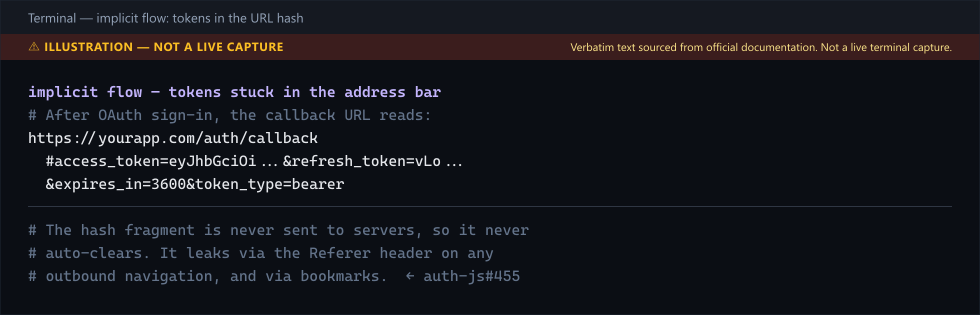
You wired Google or GitHub OAuth into your Supabase app. Sign-in works. Then a teammate shares a screenshot of their browser after login and the address bar reads:
https://yourapp.com/auth/callback#access_token=eyJhbGciOi...&refresh_token=vLo...&expires_in=3600&token_type=bearerThe tokens sit there until the user navigates away. If they click an external link, that URL — tokens included — is sent in the Referer header to the destination. If they bookmark the page, the bookmark stores the tokens. This has been tracked in supabase/auth-js#455 since the implicit flow shipped, and it is the single most common OAuth misconfiguration in Supabase apps.
The fix#
Two paths. The right one is PKCE. The fast one is a hash cleanup on the callback page.
Option A — switch to PKCE (recommended)#
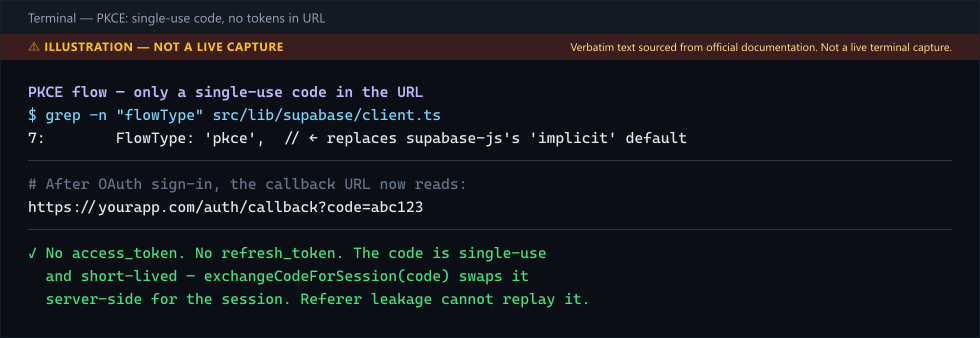
PKCE moves the token exchange server-side. The browser only ever sees a single-use authorization code in the URL, not the tokens themselves.
// src/lib/supabase/client.ts
import { createBrowserClient } from '@supabase/ssr'

export function createClient() {
  return createBrowserClient(
    process.env.NEXT_PUBLIC_SUPABASE_URL!,
    process.env.NEXT_PUBLIC_SUPABASE_ANON_KEY!,
    {
      auth: {
        flowType: 'pkce',           // ← replaces the 'implicit' default (still supabase-js's default)
        autoRefreshToken: true,
        detectSessionInUrl: true,
      },
    },
  )
}
Do the same on the server client (createServerClient from @supabase/ssr accepts the same auth.flowType option). Then update your OAuth call to use a code-challenge-friendly redirect:
const { data, error } = await supabase.auth.signInWithOAuth({
  provider: 'google',
  options: {
    redirectTo: `${window.location.origin}/auth/callback`,
  },
})
On the callback page, exchange the code for a session:
// src/app/auth/callback/route.ts
import { NextResponse } from 'next/server'
import { createClient } from '@/lib/supabase/server'

export async function GET(request: Request) {
  const { searchParams, origin } = new URL(request.url)
  const code = searchParams.get('code')
  const next = searchParams.get('next') ?? '/dashboard'

  if (code) {
    const supabase = await createClient()
    const { error } = await supabase.auth.exchangeCodeForSession(code)
    if (!error) return NextResponse.redirect(`${origin}${next}`)
  }

  return NextResponse.redirect(`${origin}/login?error=oauth`)
}
After this, the URL on callback is /auth/callback?code=abc123 — a single-use, short-lived code. No tokens leak even if the user shares the URL.
Option B — strip the hash (quick patch)#
If a PKCE migration is blocked by a release freeze, patch the callback today:
// src/app/auth/callback/page.tsx
'use client'

import { createClient } from '@/lib/supabase/client'
import { useRouter } from 'next/navigation'
import { useEffect } from 'react'

export default function CallbackPage() {
  const supabase = createClient()
  const router = useRouter()

  useEffect(() => {
    supabase.auth.getSession().then(() => {
      // Consume the hash, then destroy it from the address bar + history.
      window.history.replaceState(
        {},
        '',
        window.location.pathname + window.location.search,
      )
      router.replace('/dashboard')
    })
  }, [supabase, router])

  return <p>Finishing sign-in…</p>
}
replaceState (not pushState) is the key — it overwrites the hashed URL in history so the back button does not resurrect the tokens.
Verifying the fix#
- Sign in with OAuth in an incognito window.
- After redirect, the address bar must read
https://yourapp.com/dashboard— no#access_token=…. - Open DevTools → Network → click any outbound request to a third-party domain. The
Refererheader must be clean. - With PKCE: check the Supabase dashboard → Authentication → URL Configuration. The redirect URL and site URL must match your exact origin (no trailing slash, correct scheme). A mismatch makes
exchangeCodeForSessionreturnauth_invalid_codeand drop you back on/login?error=oauth.
For the full OAuth setup — Google provider config, redirect URLs, the difference between redirectTo and the site URL, and the Vercel-preview gotcha that breaks it — the Supabase + Google OAuth on Next.js 15 working guide covers it end to end.
When PKCE itself fails: the code verifier goes missing#
PKCE trades a hash-fragment token leak for a different dependency: before redirecting to
the OAuth provider, supabase-js generates a code verifier and writes it to
localStorage under a Supabase-prefixed key. When the provider redirects back to
/auth/callback with the authorization code, exchangeCodeForSession reads that same
key back out of localStorage to complete the exchange. If the code verifier isn't
there, the exchange fails — commonly surfacing as AuthApiError: invalid request: both auth code and code verifier should be non-empty, or downstream as the plain
AuthSessionMissingError covered in
Fix "AuthSessionMissingError: Auth session missing!".
Three situations reliably reproduce it:
- A different browser/device finishes the flow than started it. Pasting the OAuth redirect URL into a second tab, or a provider that opens the callback in a new window instead of redirecting the original one, means the callback runs in a context that never wrote the verifier.
- Safari's Intelligent Tracking Prevention partitions storage. In some in-app
webviews and privacy-hardened Safari configurations,
localStoragewritten before the cross-site redirect isn't reliably readable after it, because ITP treats the OAuth provider's domain as a separate storage partition from your app's domain during the round trip. - The redirect URL doesn't match what initiated sign-in. If
redirectToresolves to a different origin than the page that calledsignInWithOAuth— a common outcome of hardcoding a production URL while testing on a preview deployment — the callback page is, from the browser's point of view, a different site with no access to the verifier that was written on the other one.
There's no server-side fallback for a missing code verifier — PKCE is deliberately designed so the exchange only completes on the same browser storage that started it. The fix is behavioral, not code: keep the entire flow in one tab, one window, on one exact origin, and treat a redirect URL mismatch as the first thing to rule out before assuming the client library is at fault.
Further reading: Advanced Authentication Patterns with Next.js and Supabase.
Still stuck? Paste your error.
Paste the error message or stack trace — we check it against every fix and tool on the site.

Related fixes & guides
- Sign In to Supabase Without Email Verification (2026)
- Stop the Supabase getSession() Security Warning
- Fix: Multiple GoTrueClient instances detected (Supabase)
- Supabase RLS Policy Design Patterns Beyond the Basics
- Supabase Auth + Middleware: Session Guide for Next.js 15
- Complete Guide to Building SaaS with Next.js and Supabase
- 11 Supabase Auth Lessons From a Year in Production
- Supabase 42501: permission denied for schema auth
- Supabase Auth Session Disappears on Refresh? Fix (2026)
- Test Supabase RLS Policies Before You Ship